Posted on : 02-01-2014 | By : admin | In : HowTo, VerseVIEW 6
0
Please follow the following instructions to download and install VerseVIEW on your Windows or MAC PC.
- Visit the Download page on the VerseVIEW website (http://verseview.info/verseview/?page_id=17)
On computers with Internet connection and Adobe Flash
- Click on the INSTALL NOW button.

- Follow the instructions to complete the installation.
On computers WITHOUT Adobe FLASH
- Scroll to the bottom of the page and click on Adobe AIR.
- Follow the instructions and install Adobe AIR
- Then click on VerseVIEW Software and install it.

On computers WITHOUT Internet connection
- Download the Adobe AIR and VerseVIEW Software files on a USB Flash drive.
- Then following the steps above to install Adobe AIR and then VerseVIEW software.
The following Bible translations have been compiled by wordproject.org
Steps to install this Bible Database
- Download and unzip the database file
- Open VerseVIEW and click on Bible > Manage Bible from the top menu
- Click on ADD and select the unzipped XML database file.
- Click OPEN and it will add to the database.
- To change the translation, click on Bible > Select Version from the top menu and change Version 1 or 2 as needed. And click SAVE.
India
Updated on 12/25/2013
- Bengali (2.3MB)
- Gujarati (2.3MB)
- Marathi (2.3MB)
- Oriya (2.3MB)
- Punjabi (2.4MB)
- Urdu (1.6MB)
Africa
Updated on 12/25/2013
- Afrikaans (1.3MB)
- Amharic (1.5MB)
- Luganda (1.2MB)
- Somali (1.4MB)
- Swahili (1.2MB)
- Xhosa (1.3MB)
- Zulu (1.2MB)
Europe
Updated on 12/25/2013
- Bulgarian (1.7MB)
- Croatian (1.3MB)
- Czech (1.4MB)
- Danish (1.3MB)
- Dutch (1.4MB)
- German (1.3MB)
- Hungarian (1.4MB)
- Ukrainian (1.7MB)
South East Asia
Updated on 12/25/2013
- Indonesian (1.4MB)
- Thai (2.2MB)
- Vietnamese (1.4MB)
Posted on : 04-12-2013 | By : admin | In : Background, VerseVIEW 6
0
What is simulated motion graphics?
 The backgrounds used for presentation in VerseVIEW can be a solid color, a gradient between two colors, a JPEG still picture or a simulated motion graphics. The motion graphics as background could improve the aesthetic quality of the presentation. The following article describes how to setup the simulated motion graphics feature in VerseVIEW.
How does simulated motion graphics work?
The simulated motion graphics uses a still image as the base. The image is panned and zoomed in random direction and speed to create the motion graphics effect. The simulated motion graphics looks good only with abstract images. One can download a collection of abstract backgrounds [LINK]
How to create simulated motion graphics base image?
One can create the base image by applying blur filer on a colorful image. I used Adobe Photoshop to create these images from photographs I took.
How to start the motion graphics feature in VerseVIEW?
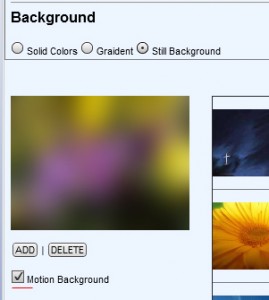 Open VerseVIEW and navigate to the graphics tab. Select the image for background and check the box that says “motion graphics”. Any presentation will have the motion graphics as background. Please note that the motion graphics feature will be disabled when the background is changed or when VerseVIEW is restarted. It will have to be enabled each time.
The following clip show a sample of how it looks:
Please promote VerseVIEW to your friends and family.
Posted on : 04-12-2013 | By : admin | In : Background
0
Graphics for VerseVIEW background (1MB, 12/4/2013)
(Copyrights: Binu Joseph)
These graphics are good for generating motion background with VerseVIEW.
Posted on : 14-10-2013 | By : admin | In : Apps
0
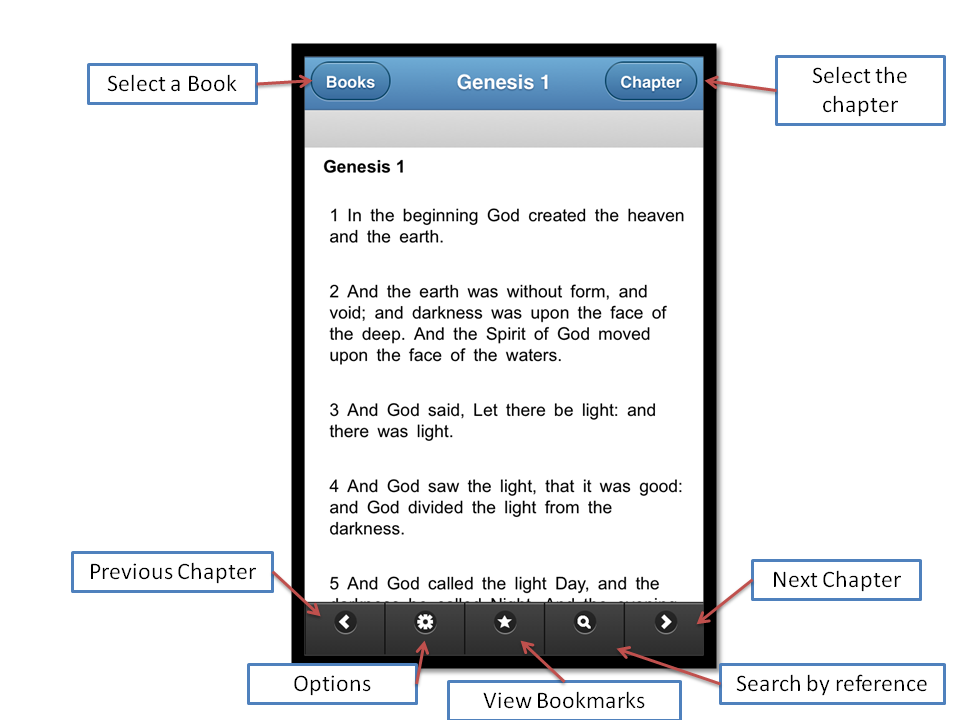
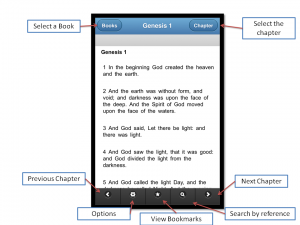
VerseVIEW Mobile Bible is a simple and easy to use application containing the Holy Bible in 5 different languages (English, Malayalam, Hindi, Tamil and Telugu). The users can read up to 3 Bible translations at a time. Each verse can be bookmarked and notes can be added to each verse. Also a reference search feature fins the verse given a reference. The navigation allows quickly switching books or chapters.
https://itunes.apple.com/us/app/verseview-mobile-bible/id725964900?mt=8
Features
- Easy Navigation
- Bible in 5 different languages
- View 3 translations at a time
- Book mark verses
- Add notes to verses
- Reference search
www.verseview.info